Foundational Knowledge

Understanding light paths for optical microscopy imaging

26 March 2026 · 7 min read
  • Foundational Knowledge

Abstract

Every stunning microscope image begins with proper illumination through a carefully adjusted optical beam path. This comprehensive guide reveals how light source, condenser, iris diaphragms like field stop or aperture stop, objectives and other components work together as an integrated system to produce optimal image quality.
Knowing these relationships enables optimized resolution, optimized contrast, homogeneous illumination of the specimen, and reproducibility of results in all microscopic applications. Whether you work with transmitted or reflected light systems: Understanding the optical beam path can improve your imaging skills and help you diagnose problems in the beam path that lead to reduced image quality.

Key Learnings:

  • How the optical beam path directly influences image formation, resolution, illumination homogeneity, and reproducibility of results
  • Differences and similarities between transmitted and reflected light paths
  • Systematic approach to diagnosing and solving image quality issues by understanding component relationships
A functional system behind every brilliant image

What is the optical beam path in a microscope?

When using a modern microscope, it’s easy to focus on objectives, cameras, or light sources in isolation. But the real performance lies in how all these elements work together, within a coordinated system known as the optical or geometric beam path.

Understanding this system is key to:

  • Optimizing contrast and resolution (i.e. adjustment of Koehler illumination)
  • Diagnosing image artifacts
  • Applying contrasting techniques
  • Getting the most out of transmitted or reflected light microscopy

How light travels through a microscope: The basic concept

The geometric beam path refers to the complete path that light travels through the microscope, from the light source to the observer or the detector. It’s not a straight line, but a well-designed sequence of optical components and planes, each with its own role.
It describes the interaction between such optical elements of a compound microscope. Experts divide the geometric beam path into two different, but closely interconnected functional parts:

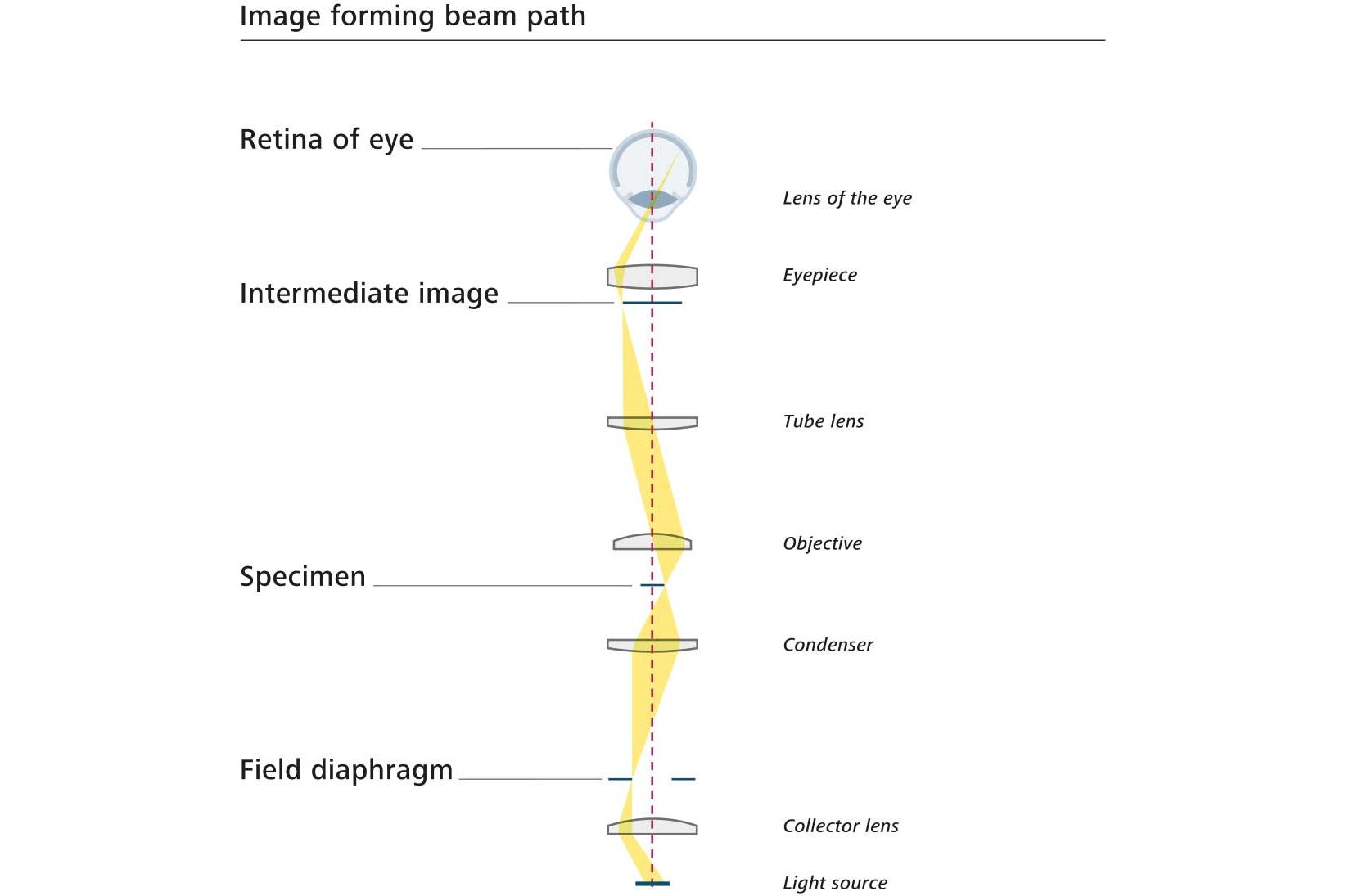
Image forming beam path

The image forming beam path contains the rays from the light source that illuminates individual points of the specimen. The entire specimen consists of a multitude of such illuminated points.


Example of a single point

To clarify the concept, consider a single point of the specimen:

  • From this point, the beam of rays diverges and carries the specimen information.
  • This information is captured by the objective and focused into the intermediate image plane.
  • There, this point is realistically imaged along with the entire specimen.
  • The observer views this intermediate image through the eyepiece and perceives it as a magnified image on the retina.


Conjugate planes
The specimen plane, intermediate image plane, and retina are interconnected planes where either the specimen itself or its image can be found. These are referred to as the conjugate planes of the image forming beam path. Find more information below in the "related articles" section.


Light distribution
The light from the light source is directed such that every single point of the specimen receives light from the entire light source. This results in a complete "mixing" of the light in the specimen plane.
⦁ Collector: Positioned immediately after the lamp, it gathers the divergent beam of light and directs it into the microscope.
⦁ Condenser: Located in front of the specimen, it converges the light into the specimen plane.

Uniform illumination
To illuminate the specimen uniformly:
1. The collector and condenser must be at defined distances from each other and from the specimen plane.
2. The height-adjustable condenser allows for optimal adjustment for the specimen being viewed.
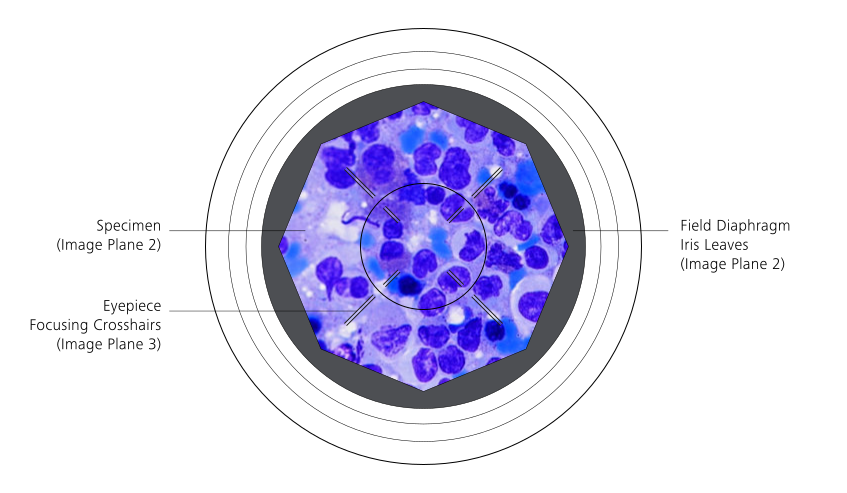
3. The built-in field diaphragm at the base of the microscope stand serves as an aid.When the field diaphragm is in focus along with the specimen, the height of the condenser is correctly adjusted (find more information below in the "related articles" section). The plane of the field diaphragm belongs to the conjugate planes of the image forming beam path.

Identifying dirt or dust

  • How it appears: Dirt or dust present in or near a conjugate plane of the image forming beam path appears sharp and in focus together with the specimen.
  • How to identify it clearly: Because the contamination is visible in focus, you can pinpoint its location along the image forming path and decide which optical surface requires cleaning.

Illuminating beam path

The illuminating beam path also starts in the light source, but carries the information of the light source through the microscope to the observer or detector.

It determines the illumination of the specimen. The illuminating beam path influences resolution, contrast, and illumination homogeneity of the sample, also known as the pupil beam path.

Role of the collector and condenser

  • Collector: Directs a large portion of these rays into the microscope and focuses them on the front focal plane of the condenser, creating an image of the lamp structure. The specimen’s contrast is influenced in this plane; this is where the condenser diaphragm or annular ring stops for phase contrast or darkfield are located.
  • Condenser: Distributes light rays from one point of the light source as widely as possible across the entire specimen, ensuring uniform illumination despite the inhomogeneity of the light source.


How the objective and eyepiece shape the illuminating beam path

After passing through the specimen, the light enters the objective and is focused into its back focal plane where the microscope creates a new image of the light source. This happens because the back focal plane is optically linked to the condenser’s front focal plane. Any components placed in that condenser plane, such as phase annuli or darkfield stops, also appear in this optical level. Additional contrast elements, including phase rings that support phase contrast, can be located directly in the objective’s back focal plane. From this point, the light rays spread out again. The eyepiece captures these diverging rays and forms an image of the light source in the exit pupil of the microscope, which is the position where the observer’s own eye pupil is located.


Conjugate planes 

The illuminating beam path contains several key conjugate planes: the lamp structure, the front focal plane of the condenser, the back focal plane of the objective, and the exit pupil of the microscope. The observer’s own eye pupil lies in the exit pupil, which is why this part of the optical train is also called the pupil beam path.
You can view these conjugate planes directly by removing an eyepiece and looking down the tube, or by using tools such as a diopter eyepiece, a telescopic eyepiece, or a Bertrand lens.


Identifying dirt or dust

  • How it appears: Dirt or dust in or near a conjugate plane of the illuminating beam path appears blurry when viewed through the eyepieces.
  • How to identify it clearly: Remove the eyepiece to investigate the illuminating beam path directly. This allows clear identification of the contamination and helps you determine what needs to be cleaned.

This knowledge simplifies and enhances cleaning efficiency.
Intertwined structure of both beam paths

The conjugate planes of the image forming and illuminating beam paths alternate throughout the microscope. A plane of the image forming path is followed by a plane of the illumination path, and this pattern continues through the entire optical system.

This alternating structure is the basis of Koehler illumination, which ensures uniform illumination in the specimen plane and supports optimal image quality. Find more information below in the "related articles" section.

Both beam paths extend from the light source all the way to the retina or to the detector of a camera system, and although they serve different functions, they remain intertwined within the microscope’s geometric beam path.

Why did we start with transmitted light microscopy?

Transmitted light microscopy is not just where microscopy historically began. It's still the most instructive setup to understand how optical systems behave.

It’s ideal for:

  • Transparent or semi-transparent specimens (cells, tissues, algae, protists, rock thin sections)
  • Learning the interaction of optics and sample
  • Exploring contrast methods like brightfield, phase contrast, DIC

Reflected light microscopy, which you will explore below, uses a different path: the light travels onto the surface of the sample and is reflected back there. It’s used for opaque materials like metals or semiconductor wafers.

Explore the full optical path visually

Our interactive diagram lets you explore:

  • Transmitted and reflected light paths inside the microscope
  • All key optical components and planes
  • Hover-activated explanations

Tutorial guide

This tutorial illustrates the journey of light through a microscope, showcasing the interaction between the image-forming and illuminating beam paths in both transmitted and reflected light.

  • Start with the Outside View to explore the microscope’s main components: hover over the info icons to learn about their function. This view helps you build a basic orientation before diving inside the optical system.
  • Switch to the Inside View to see a longitudinal section of the microscope. Hover over the info icons to discover all conjugate planes of both, the image forming beam path and the illuminating beam path in both, transmitted and reflected light.
  • Activate Transmitted Light to visualize illumination from below. This illumination shows the light bundles from the transmitted light source which travel through the condenser, pass the specimen from below and travel further to the observer’s eye or to the camera sensor. This illumination transmits the specimen; therefore, the specimen must be transparent or translucent. The colors indicate the two beam paths: Yellow shows the trajectory of the image forming beam path, red indicates the trajectory of the illuminating beam path, while in the orange areas the light from the two beam paths is not separated from each other but mix together.
  • Activate Reflected Light to explore illumination from above. This illumination shows the light bundles from the reflected light source, which illuminate the surface of the specimen from above through the objective. From there, the light is reflected into the observer’s eye or onto the camera sensor. The specimen surface reflects the light of the reflected light illumination; so, the specimen must be opaque. The colors indicate the two beam paths: Yellow shows the trajectory of the image forming beam path, red indicates the trajectory of the illuminating beam path, while in the orange areas the light from the two beam paths is not separated from each other but mix together.
  • Select Layers: Choose between the different:
  • 1) Image-Forming Beam Path (yellow): Shows only the trajectories of two example light bundles from this beam path: These two bundles are: One that starts at a single point on one side of the light source, diverges and illuminates the entire specimen, while the other light bundle also starts at a single point, but on the other side of the light source, and also illuminates the entire specimen. Planes in which the entire beam path appears yellow are conjugate planes of the image forming beam path in which you the specimen or its images. The most important learning point is: Every single point of the light source illuminates the entire specimen, i.e., all inhomogeneities of the light source are distributed over the entire specimen, and the specimen is illuminated homogeneously because the light source is completely out of focus in the specimen plane.
  • 2) Illuminating Beam Path (red): Shows only the trajectories of two example light bundles from this beam path: These two light bundles are: One that starts at all points of the light source and illuminates only one point on one side of the specimen, while the other light bundle, which emanates also from all points of the light source, illuminates a second point of the specimen on its other side. Planes in which the entire beam path appears red are conjugate planes of the illuminating beam path, in which you will find images of the light source. The most important learning point is: Every single point of the specimen receives light from the entire light source, i.e., all inhomogeneities of the light source mix completely at every single point of the specimen plane, the specimen is homogeneously illuminated because the light source is completely out of focus in the specimen plane.
  • 3) Conjugate Planes: highlights the conjugate planes - field, aperture, and intermediate image planes - either separately for each beam path or all together, depending on your choice of beam path —.
  • Where the yellow and red parts of the beam paths overlap,i.e. in its orange areas , the light from the illuminating and and imageforming beam paths is mixed. The light is only completely separated into the two beam paths in the respective conjugate planes. – these planes are crucial for image formation the setting and control of contrasting techniques, resolution, image contrast, stray light reduction, and illumination homogeneity.


FAQ

  • If the field diaphragm does not become sharp in your microscope, the condenser height is not adjusted correctly. The condenser must image the field diaphragm into the specimen plane. Raise or lower the condenser until the diaphragm edge becomes crisp, then center it. If focusing still fails, check whether the condenser is properly clicked into place and whether any phase or darkfield stop is inadvertently inserted.

  • Dirt that appears sharp in your microscope image sits in the image‑forming beam path, usually on the objective front lens, the intermediate image plane, or the camera sensor.
    Dirt that appears blurry and moves when you rotate an eyepiece sits in the illuminating beam path, often on the collector lens, condenser, or near the exit pupil. To inspect the illuminating path directly, remove an eyepiece and look down the tube. This helps pinpoint where cleaning is needed and prevents unnecessary handling of clean optics.

  • The back focal plane of a microscope objective contains an image of the light source and any components placed in the illumination conjugate plane, such as the condenser aperture diaphragm, phase annuli, or darkfield stops. Inspecting this plane with a Bertrand lens or telescopic eyepiece lets you verify Koehler illumination, check phase‑contrast alignment, and understand how your illumination fills the objective aperture. It is one of the most useful locations for diagnosing alignment and illumination issues.

training education academi portal

Boost your Microscopy Skills

Join the ranks of world-leading microscopists with our expert training courses. Whether you're in academia or industry, a biologist, materials scientist, or somewhere in between, our training courses will help you unlock the full potential of your microscopy skills.

Please note that in some cases, you may be prompted to enter your login credentials again to access certain areas or resources within our training platform.


Share this page